A Matrix chat you sign in to with Pubky Ring, and how to run your own
matrix.pubky.pastalabs.dev is a Matrix server with no passwords: you sign in by approving a QR code in Pubky Ring, and your Pubky key becomes your Matrix ID. Here is how to join it, and how to run the same setup with Tuwunel and pubky-oidc.
There is now a Matrix chat server at matrix.pubky.pastalabs.dev, and its sign-in is a little different: no password, no email, no sign-up form. You scan a QR code with Pubky Ring, approve, and you are in.
The idea
On Pubky, your identity is a key you hold in Pubky Ring, not an account on someone's server. This server reuses that identity for chat:
- your Pubky key becomes your Matrix ID:
@<your-pubky-key>:matrix.pubky.pastalabs.dev; - your display name comes from your Pubky profile;
- signing in again with the same key brings you back to the same account;
- there is nothing to remember and nothing to leak: the server never sees a password, because there is none.
Under the hood, a small sign-in gateway at auth.pubky.pastalabs.dev speaks OpenID Connect to the Matrix server (Tuwunel, written in Rust). Its only sign-in method is the Pubky Ring QR code. The gateway is open source: PastaGringo/pubky-oidc, and it works with any app that supports OpenID Connect, not only Matrix.
Tutorial: join from your browser
You need Pubky Ring with your Pubky identity in it. The steps below use Element, the best-known Matrix client, in its web version.
1. Point Element at the server
Open app.element.io. On the Sign in screen, next to Account provider, click Edit, choose Other account provider, type matrix.pubky.pastalabs.dev and confirm.
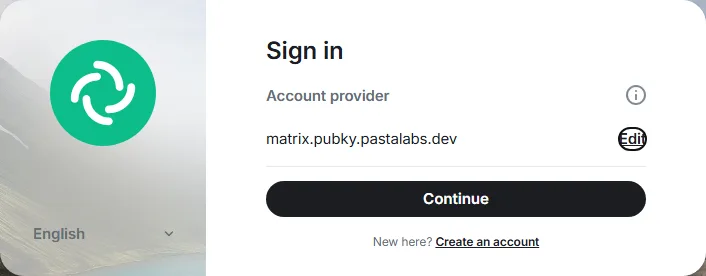
2. Continue to the Pubky sign-in
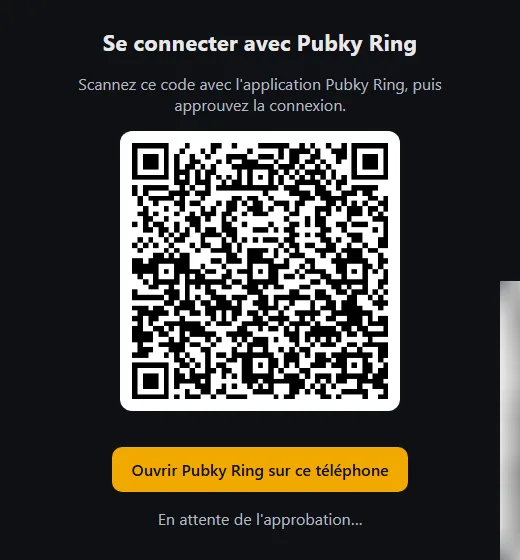
Click Continue. Element sends you to the sign-in page of auth.pubky.pastalabs.dev, which shows a QR code. The page is in French for now: its title reads Se connecter avec Pubky Ring ("Sign in with Pubky Ring").
3. Approve in Pubky Ring
- On a computer: scan the QR code with Pubky Ring.
- On your phone: tap the yellow button, Ouvrir Pubky Ring sur ce téléphone ("Open Pubky Ring on this phone").
Approve the request in Pubky Ring. The page waits for you (En attente de l'approbation…, "Waiting for approval…"), then moves on by itself.
4. Confirm, and you are in
The Matrix server shows one last page, Continue sign-in: "You are signing in as @<your-pubky-key>:matrix.pubky.pastalabs.dev to https://app.element.io/". Click Continue and Element opens, signed in. The first time, your account is created on the spot.
5. Start chatting
To talk to someone on the server, start a conversation with their Matrix ID, @<their-pubky-key>:matrix.pubky.pastalabs.dev.
Good to know
- This server does not federate. You can talk with people who have an account on matrix.pubky.pastalabs.dev, but not with users of matrix.org or other Matrix servers.
- It is an early version. If the sign-in gateway restarts while you are on the QR page, that sign-in is lost: just start again. Your Matrix account is not affected.
- Clients: the steps above were tested with Element web.
Run your own: Tuwunel + pubky-oidc
The same setup fits in three containers: Tuwunel for Matrix, pubky-oidc for the Pubky Ring sign-in, and Caddy in front of both for HTTPS.
What you need
- A Linux server with Docker and Docker Compose, and ports 80 and 443 open.
- A domain with two DNS records pointing to that server. Below they are
matrix.example.com(the Matrix server) andauth.example.com(the sign-in page): replace them everywhere with yours.
Your users' Matrix IDs will be @<pubky-key>:matrix.example.com. The server name cannot be changed once accounts exist, so pick it now.
1. The files
Create a folder, say matrix/, with three files.
compose.yml:
services:
  caddy:
    image: caddy:2
    restart: unless-stopped
    ports:
      - "80:80"
      - "443:443"
    volumes:
      - ./Caddyfile:/etc/caddy/Caddyfile:ro
      - caddy-data:/data

  tuwunel:
    image: ghcr.io/matrix-construct/tuwunel:v1.9.4
    restart: unless-stopped
    environment:
      TUWUNEL_CONFIG: /etc/tuwunel/tuwunel.toml
    volumes:
      - ./tuwunel.toml:/etc/tuwunel/tuwunel.toml:ro
      - ./secrets/pubky_client_secret:/run/secrets/pubky_client_secret:ro
      - tuwunel-data:/var/lib/tuwunel

  pubky-oidc:
    build: https://github.com/PastaGringo/pubky-oidc.git
    restart: unless-stopped
    environment:
      ISSUER: https://auth.example.com
      CLIENT_ID: pubky-ring
      CLIENT_SECRET: ${PUBKY_CLIENT_SECRET}
      REDIRECT_URIS: https://matrix.example.com/_matrix/client/unstable/login/sso/callback/pubky-ring
    volumes:
      - pubky-oidc-data:/data

volumes:
  caddy-data:
  tuwunel-data:
  pubky-oidc-data:
Caddyfile, which also gets the HTTPS certificates for you:
matrix.example.com {
	reverse_proxy tuwunel:8008
}

auth.example.com {
	reverse_proxy pubky-oidc:4000
}
tuwunel.toml:
[global]
server_name = "matrix.example.com"
database_path = "/var/lib/tuwunel"
address = ["0.0.0.0"]
port = 8008
# A private server: no federation, no password sign-up.
allow_federation = false
allow_registration = false
# Display names come from Pubky profiles, as they are.
new_user_displayname_suffix = ""

[global.well_known]
client = "https://matrix.example.com"

[[global.identity_provider]]
brand = "Pubky"
name = "Pubky Ring"
client_id = "pubky-ring"
client_secret_file = "/run/secrets/pubky_client_secret"
issuer_url = "https://auth.example.com"
callback_url = "https://matrix.example.com/_matrix/client/unstable/login/sso/callback/pubky-ring"
scope = ["openid", "profile"]
# The Pubky key (the `sub` claim) becomes the Matrix user ID, with no random fallback.
userid_claims = ["sub"]
unique_id_fallbacks = false
The key line is userid_claims = ["sub"]: pubky-oidc puts the Pubky key in sub, so it becomes the Matrix user ID. unique_id_fallbacks = false makes sure Tuwunel never invents another one.
2. A shared secret
Tuwunel and pubky-oidc must share a client secret. Generate it once, in the matrix/ folder:
mkdir -p secrets
openssl rand -hex 32 | tr -d '\n' > secrets/pubky_client_secret
echo "PUBKY_CLIENT_SECRET=$(cat secrets/pubky_client_secret)" > .env
chmod 600 .env
Tuwunel reads it from the file, pubky-oidc from the .env file that Docker Compose loads.
3. Start
docker compose up -d --build
Docker builds pubky-oidc straight from its GitHub repository, then starts the three containers. Caddy needs a minute to get the certificates.
4. Check
curl https://matrix.example.com/_matrix/client/versions
curl https://auth.example.com/.well-known/openid-configuration
Both must answer with JSON. Tuwunel itself fetches the second URL to find the sign-in page, so your server must be able to reach its own domain.
Then sign in exactly as in the tutorial above, with matrix.example.com as the account provider. The first person to sign in gets the first account; anyone with Pubky Ring can join after them.
Keep in mind
- Keep the
pubky-oidc-datavolume. It holds the keys pubky-oidc signs with; losing them signs everyone out. - Back up
tuwunel-data. It is the Matrix database: accounts, rooms, messages. - The files above were tested end to end, from the QR approval to a Matrix account and back, with a throwaway Pubky identity standing in for Pubky Ring, on a local copy of this setup served over plain HTTP. The
Caddyfilewas checked withcaddy validate.
Questions about Pubky Ring itself? Have a look at the Pubky projects on pubky.pastalabs.dev.